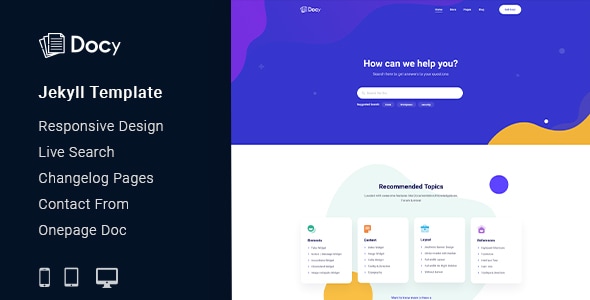
Docy is a powerful, responsive, and high-performance Jekyll documentation template that can assist you quickly develop your next product’s documentation. It can be used for documenting API, frameworks, plugins, templates, software, user manual, etc. It’s based on Bootstrap 4 and includes a lot of elements to make your interactive documentation efficient.
We designed Docy for the readers, optimizing not for page views or engagement — but reading. And it turns out that context is a vital part of learning.
Docy is not only a template but also a package of tools for creating product documentation in the best way. We followed the best coding practice by maintaining w3.org standards, made it search engine friendly (SEO optimized), perfect on any device (desktop, laptop, mobile, iPad).
Here are some key features of Docy that make this template better than other knowledgebase template.
- Responsive Layout
- Built with Bootstrap 4.3
- CSS3 & HTML5 validated by w3.org standards
- SCSS files included
- Megamenu
- Semantic coding
- 35+ Pages
- Sticky sidebar
- Full-width layout
- Syntax highlighter
- Button variations
- Typography
- Tabs
- Alerts / Messages / Notes
- Accordion
- Lightbox
- Tooltips
- Carousel
- Directory explanation
- File tree navigation
- Table of content
- Software Change-log
- Property table
- Article feedback
- Responsive video (YouTube, Vimeo, Self-hosted)
- Easy to Customize.
- Bootstrap 4 Responsive Framework
- Unique and Modern Style.
- Super Clear and Clean Layout.
- Awesome and Creative Design.
- Great CSS Animations.
- Search Engine Optimised Code.
- W3C Validated Code.
- Mailchimp integrated.
- Free Google Fonts.
- Free Font Based Icons.
- All Modern Browser Supported.
- Developer friendly code.
- Free Update.
- Well Commented Code
Here are some amazing tools that will help you build your product documentation interactively.
- Dark mode switcher.
- Font size switcher
- Full-width and Box width container-based.
- Article Table of contents (on this page)
- Documentation with sticky and non-sticky header
- Onepage documentation
- Documentation feedback
- Dynamic, informative pre-loader on every page
- Footnotes for doc reference
- Page preview tooltip
- Can I use? for showcasing appropriate and inappropriate options
- Image Hotspot to point out the targeted parts of an image
Sources and Credits
- Icon Font: The Elegant Icon
- Icon Font: fontawesome
- Images Used: Freepik, Unsplash
Contact Support
This store provides 6 months of support for this item. If you have purchased this item and need technical assistance, please open a support ticket.
Support Includes:
- Answering technical questions about item's features
- Assistance with reported bugs and issues
- Help with included 3rd party assets
0 Reviews
View on Spider Themes12 comments found.
Can page contents be written in markdown?
Yes.
Compatible with Github Pages?
Congratulation, best of luck with sales :)
I am Disappointed!
I've spent the last few hours trying to fix the links of this theme in order to produce any usable local site but without luck!
This is a waste of my time ...I'll request a refund!
thanks. I look forward for a reply from the developer.
Go to _config.yml and replace the url with " ".
https://prntscr.com/23j8jgd
Thanks
Tried that! Even disabling url: does not help. The theme does not seems to be coded properly to allow for portable running without running via a server. Any other thoughts?
We solved the problem. In the next version you will find updated theme.
Thanks
Then set the site url and base url as follows
https://prnt.sc/23kusg0
Thank you. This is a partial solution and not completely portable. I'll watch out for the new update. Please have a look at some of the great portable jekyll examples which work out of the box e.g. https://github.com/tomjoht/tomjoht.github.io.
The link is not working.
We are very sorry that we are not releasing any updates right now because it is not possible to run both without the server and with the server. We tried to make the theme portable but it caused problems for the server .As most users use the server, so we focus primarily on the server environment. As it is a complex design theme, our updated portable theme works fine partially in the local environment but it breaks down on the server so you need to convert the theme separately for portable.
Thanks.
Hi,
Just to add to my last email and by examining the produced index.html, there are trailing '/' e.g. . Correcting this to: , solves the problem.
Clicking on any of the pages, produces the wrong link too and an error is produced. So it seems that a revision of the script is needed to produce the right links locally.
Could you please help setting up things correctly?
by the way, the search does not work properly, even on the server. A search for an item shows a list but clicking on any of the search results has no effect. I thought this is not useful and a search results page is much better.
Thanks.
Hi,
I've just bought this item and discovered that the theme cannot be build locally. I've used the command:
bundle exec jekyll build -d demo
But the created site does not display propely. Headings and images are not displayed.
However, using
bundle exec jekyll serve
The website is rendered OK. Could you please help me find out what I am missing? I do not want to use a server, it must be built locally like any other Jekyll site.
I look forward to hearing from you.
Thanks
Can it be deployed to GitHub pages?
Congratulations! GLWS :)
Good luck!
Really nice design!