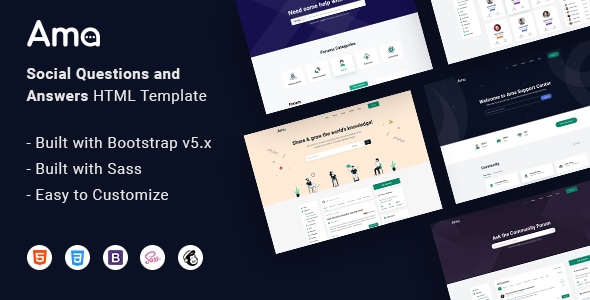

Ama is a stunning, professional, and flexible social question and answers HTML template specially designed for Online Communities, Niche Questions and Answers Websites, Marketing Websites, Developers Websites, or any kind of Social Communities.
100% Fully Responsive
AMA is fully responsive for all major screens and resolutions.
Retina Ready
AMA includes retinal supported images, icons. So they look great, sharp in retina displays.
Bootstrap 5
AMA is coded based on Bootstrap and SASS, so editing and adding your own content is quite easy.
SOURCES & CREDITS
- Photo by Unsplash, Freepik
- Illustration by Freepik
- Icon by Flaticon & The Elegant Icon Font, ionicons
Contact Support
This store provides 6 months of support for this item. If you have purchased this item and need technical assistance, please open a support ticket.
Support Includes:
- Answering technical questions about item's features
- Assistance with reported bugs and issues
- Help with included 3rd party assets
0 Reviews
View on Spider Themes8 comments found.
https://preview.themeforest.net/item/ama-social-questions-and-answers-html-template/full_screen_preview/34991940?_ga=2.44421156.1078582854.1657775015-1808014280.1657775015
Also there a bug in this page when you open it on iphone safari browser, you find the search box is not optimized with the dropdown list beside it
any response?!?!
Hello
How to turn off the dark mode in the theme for ever?
I have turned it off but it still shown on iphone safari browsers!
i did it, but also still displaying the dark mode!
hello,
i have bought your theme and implemented it on my website, but noticed that there are tens of thousands of weird pages have been generated in my website!
check this:
https://www.google.com/search?q=site:https://examplegeek.com&rlz=1C1BNSD_enSA947SA947&sxsrf=APq-WBsVpoSo_7OtnOIGPAoNoJZZao8TCg:1647827810521&ei=Yts3Yuu5H8GJ9u8P9r-H4A0&start=0&sa=N&ved=2ahUKEwjr8q_6jNb2AhXBhP0HHfbfAdw4MhDy0wN6BAgBEDY&biw=1536&bih=696&dpr=1.25
what is the reason?!
hi, does the theme contains login and signup and change password forms?
WordPress version. I really love it.
Great Work,Congratulations GLWS :)
Congratulation, best of luck with sales :)
Congratulations GLWS :)