Video Preview
Fully wooCommerce integrated
Dark/Light Mode Switcher.
Theme Auto Update Enabled
Support Center with bbPress Forum
Unlimited Onepage & Multipage Documentations
Gutenberg Optimized
Fully WPML & RTL Compatible
GDPR Ready
Child theme included
PSDs included with Images, Graphics.

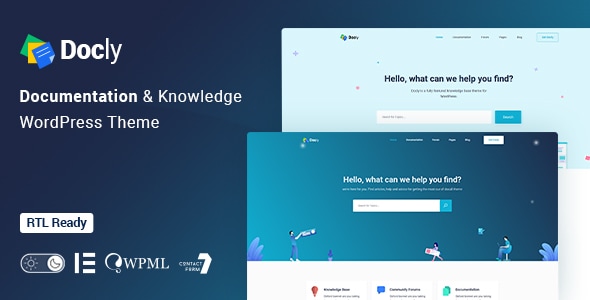
Docly is a powerful, responsive, and high-performance online documentation WordPress theme that can assist you quickly developing your next product’s documentation. You can effectively create documentation for documenting API, frameworks, plugins, software, templates, and any type of product. It includes a lot of elements to make your documentation interactive and efficient. This theme is completely responsive and mobile-friendly.

We designed Docly for the readers, optimizing not for page views or engagement — but for reading. And it turns out that context is a vital part of learning.
Docly is not only a theme but also a package of tools for creating product documentation in the best way. Docly follows the best coding practice by maintaining w3.org standards. We developed the theme search engine friendly (SEO optimized) and perfect on any device (desktop, laptop, mobile, iPad).
Docly Theme Features and Tools
Docly has some amazing tools that will help you build your product documentation interactively and reading-friendly. Here are some key features that make the theme better than other knowledgebase themes.
- Dark mode switcher.
- Font size switcher
- Full-width and Box width container-based doc pages.
- Article Table of contents (on this page)
- Documentation with sticky and non-sticky header
- Dynamic, informative pre-loader on every page
- Footnotes for doc reference
- Page preview tooltip
- Directory indicator
- Conditional content
- Image Hotspot for pointing out the targeted parts of an image
- Responsive Layout
- CSS3 & HTML5 validated by w3.org standards
- 100% Valid and Semantic coding
- 40+ Pages
- Sticky sidebar
- Full-width layout
- Syntax highlighter
- Tabs
- Alerts / Messages / Notes
- Accordion
- Lightbox
- Tooltips
- Carousel
- File tree navigation
- Table of content
- Property tabl e
- Article feedback
- Easy to Customize.
- Bootstrap 4 Responsive Framework
- Unique and Modern Style.
- Search Engine Optimised Code.
- Mailchimp integrated.
- All Modern Browser Supported.
- Well commented code
Sources and Credits
- Icon Font: The Elegant Icon
- Icon Font: fontawesome
- Images Used: Freepik, Unsplash
Changelog
2.4.0 (23 July 2026)
New: Rebuilt license system with dedicated Envato purchase-code and Freemius license handling, AJAX-based activation, and feature gating
Added: New theme settings control for enhanced customization
Added: Sign In/Sign Up ACF field groups
Improved: Register/Verify page rebuilt on the new license system with refreshed markup and styling
Improved: Updated theme setting icons
Improved: WooCommerce My Account login form design
Fixed: Resolved the Forumax notice issue
Fixed: Author page and WooCommerce checkout page UI issues
Fixed: Multiple minor bug fixes and improvements
2.3.2 (29 January 2026)
Added: Antimanual plugin added to required plugins list for improved content control
Improved: Codebase refactored by removing forum-related files, scripts, sidebars, and settings
Improved: Introduced Forumax version check with critical admin notice for outdated installations
Improved: Header styling standardized for Forumax pages with user page color overrides
Tweaked: Forum-related widgets removed from Docly and made available exclusively in Forumax
Tweaked: SCSS and CSS formatting improved, unused styles removed, and assets regenerated
Tweaked: Code indentation and formatting standardized for better readability and maintenance
Removed: bbPress integration fully removed from the theme and migrated to Forumax plugin
2.3.1 (20 December 2025)
Enhanced: Docly license verification handling
2.3.0 (16 December 2025)
New: Jobus plugin integrated for seamless job management functionality
New: AJAX-based license verification added with improved first-attempt validation
Fixed: Cart page button hover color issue resolved
Tweaked: Improved overall compatibility and stability across core features
Tweaked: Minor UI and performance improvements for a smoother experience
2.2.0 (26 November 2025)
New: Classic Menu icon color fields added (Icon Color → Hover Color, Sticky Icon Color → Sticky Hover Color)
Fixed: Prevented empty search submissions in Docly hero search forms
Fixed: Logo display issue
Improved: Breadcrumb padding and shape image positioning
Improved: Hero search form background shape responsiveness
2.1.5 (13 September 2025)
Fixed: Deprecated text domain issue
Fixed: Footer widget alignment issue
Tweaked: Box shadow issue on forum profile resolved
Tweaked: Restored missing dropdown arrow icon in the menu
Tweaked: Improved reply and topic voting button hooks
Tweaked: Enhanced forum user profile on mobile screens
Tweaked: Subscribe widget image upload field issue resolved
2.1.4 (30 May 2025)
New: Keyword style control added in the "Hero Search" widget
Fixed: Deprecation warning by wrapping translatable content in hook
Fixed: Resolved the Testimonials Widget icon issue
Fixed: Resolved the product view cart button design
Fixed: Docs sidebar widget issue resolved
Fixed: CTRT+Click new tab issue
Fixed: Some issues of testimonial Widget
Tweaked: Improved some dark mode issues
Tweaked: Updated the Elementor Deprecated functions
Tweaked: WooCommerce outdated files
2.1.3 (30 September 2024)
Fixed: Topic tag page was showing all the topics not showing by the current tag
Fixed: Blog, Shop, and footer list item design issue
Fixed: WooCommerce Outdate template file
Fixed: FAQs content gap
Fixed: Title typography, color, and description text color in the Alert box widget
2.1.2 (11 July 2024)
Fixed: Solved sidebar issue on the forum page
Fixed: PHP deprecation notice Fixed
Fixed: Topic create as anonymous issue solved
Tweaked: Removed duplicated JS. (same JS exists in EazyDocs)
2.1.1 (06 December 2023)
Fixed: Dropdown menu active color issue
2.1.0 (08 November 2023)
Fixed: Hide Draft Docs from Ajax search result
Fixed: Mobile menu dropdown item
2.0.9 (25 October 2023)
Fixed: Blog post image size issue
Fixed: Child theme when installed and activated, the color codes don't work.
Fixed: Deprecated demo importer plugin functions
Tweaked: Animate (Motion) effects
Updated: wooCommerce outdated template files
Updated: Demo contents
2.0.8 (24 June 2023)
Fixed: Custom JS code was not working
Fixed: Elementor deprecated function error
Tweaked: Removed some unessential attributes from Elementor widgets
2.0.7 (30 December 2022)
Fixed: Uncaught Error: Call to undefined function eazydocs_get_option() in /docly/template- parts/header-elements/search_banner.php:13
Updated: Demo content xml file updated from the new server
2.0.6 (26 December 2022)
Fixed: Parent Theme styles was not working with Child theme
Fixed: Some elementor widgets color issues with dark mode
2.0.5 (06 December 2022)
Fixed: Search form issue solved
Fixed: Single doc dark mode text color issues solved
New: Added faq terms in the search result
2.0.4 (09 September 2022)
Integrated: BBP Core
New: Voting Feature
New: Private Reply feature
2.0.3 (04 July 2022)
Tweaked: Compatibility with EazyDocs improved
Updated: Theme Settings demo content
2.0.2 (24 June 2022)
Tweaked: External link styled differently
Tweaked: Compatibility with EazyDocs improved
2.0.1 (14 June 2022)
Fixed: JS console error on the docs and OnePage doc pages
Fixed: Child Theme's style was not overriding the main theme's style
Updated: Docly Child theme to 1.1.1 version (included in the theme package)
Tweaked: Compatibility with EazyDocs improved
2.0.0 (10 June 2022)
Update Notice/Guide: https://tinyurl.com/2aaux85v
BIG CHANGE: weDocs plugin replaced with our own EazyDocs plugin (https://wordpress.org/plugins/eazydocs/)
Altered: OnePage Doc creation system moved to EazyDocs plugin (the old method is still working)
Moved: Doc Settings removed from Theme Settings and moved all the Doc related settings to the EazyDocs plugin
Tweaked: Bootstrap version upgraded to v5.1.3 from v5.0.0-beta3
1.5.4 (7 April 2022)
Fixed: Elementor notice about typography
1.5.3 (21 January 2022)
Fixed: Doc link was not working if doc slug change in the "(Docly) Docs List" WordPress widget
Fixed: Forum topics page breaks if no topics found.
Fixed: Docly child theme's stylesheet (style.css) was replacing the main theme's style.css (docly-child.zip included in the theme package)
Tweaked: Blog single post title tag changed to h1 from h2
1.5.2 (10 November 2021)
New: Custom Fonts support added
Fixed: Forum user profile Favorites
Tweaked: Removed filters from Forum user profile page (filters is not suitable there)
Tweaked: Sticky, Closed status badges added to Forum Topics
1.5.1 (17 October 2021)
Tweaked: Articles Title string changing option added to Theme Settings > Doc Settings
Tweaked: "FAQ Tabs" Elementor widget (Category Order and Order by options added under the Filter tab)
Tweaked: Post status published posts will show on doc ajax search results
Fixed: Docs label was not changing along with the docs slug change from Theme Settings > Doc Settings
Fixed: Github social icon was not showing
Fixed: Forum Topic Replies (last reply was not showing and +1 reply count was showing in the pagination)
1.5.0 (30 September 2021)
New: Custom Posts options added to the Theme Settings > General page
Fixed: Continue Reading Label text was not changing on Blog Grid Category layout
Tweaked: Breadcrumb structure (docs section link added)
Tweaked: Performance improved. wc-block-style and wc-block-vendors-style disabled by default. You can enable it from Theme Settings > Shop > Gutenberg Blocks
1.4.9 (12 September 2021)
New: [authors] shortcode added for viewing all authors of the website
Tweaked: Header Navigation colors, Menu active/hover states
Tweaked: Made the Header nav container consistent with the Doc page layout on the Doc single page
Tweaked: Blog pages (featured post shadow, Post title on post details page)
1.4.8 (11 September 2021)
Fixed: Forum freshness (who was last active in a forum) link was not showing correctly
Tweaked: Menu color made black on the Archive page.
Tweaked: Author post archive page (author description shown below to the author name)
1.4.7 (26 August 2021)
Tweaked: wpml-config.xml file updated with still_stuck_text, help_form_link_text, doc_feedback_label
Tweaked: views text made translatable
1.4.6 (20 August 2021)
Fixed: Theme's default brand color scheme was not showing in Firefox
Fixed: Tooltip popups were not appearing.
Fixed: Author links of Forum Reply on Forum Topic page
Tweaked: wp-custom.js file merged to main.js file in the docly > assets > js folder
Tweaked: Shop (product image linked in shop page, product gallery border color changed to brand color)
New: Global Search settings added to Theme Settings > General (Ajax Search, Focus Search by "/")
New: Doc Meta show/hide option added to Theme Settings > Doc Settings
1.4.5 (10 August 2021)
Fixed: Page content appearing on Main Menu dropdown item hover when you have Mega Menu
Tweaked: Product details page (Gallery carousel and magnify glass enabled for product images, Product Add to Cart and Review form design improved)
Updated: Language (docly.pot) file
Updated: New support center URL updated https://docs.creativegigs.net/forum/docly-wordpress-theme/
1.4.4 (30 July 2021)
Tweaked: Docs archive page linked in the breadcrumb.
Tweaked: Docs archive page design ([wedocs] shortcode output)
Fixed: The search keyword showing at the append of "Search result for:" text on the Search Results page.
1.4.3 (19 July 2021)
New: Shop settings added under Theme Settings page
Tweaked: Products, Product Categories, Filter by Price, Product Search widgets style improved
Tweaked: Search Banner placed instead of the Titlebar on the Shop and Product details page
Fixed: Product image sizes (you need to regenerate the product images to get the sizes fixed)
1.4.2 (14 July 2021)
New: wooCommerce support enabled with Shop, Cart, Checkout, My Account pages
New: Author name and Doc post views added bellow to the Doc Title
New: Breadcrumb Show/Hide and Date Published, Modified options added to Theme Settings > Header > Search Banner
Updated: docly-core-en_US.pot in the Docly core plugin
Tweaked: Blog posts shadow (used more accurate subtle shadow)
Tweaked: Search in bbPress forums from the Forum archive page's Search Banner.
Tweaked: The "Focus Search by /" option moved to Theme Settings > General from Theme Settings > Doc Settings > Search Banner
1.4.1 (05 July 2021)
Fixed: When you unfold the doc section tree, the section title jumps a line and this happens only since the last theme update.
Fixed: Doc Right Sidebar's widget content overflows on sticky mode (desktop screen)
Fixed: Doc Right Sidebar overflows on sticky mode on tablet screen
Fixed: Doc Feedback form not working on mobile
Tweaked: Doc Feedback area and the Comment form view improved on mobile
Tweaked: Doc Right Sidebar show hide Toggle arrow added on mobile view
1.4.0 (25 June 2021)
Tweaked: Onepage navigation
Tweaked: Made the "No Results Found" text translatable.
Fixed: New Metaboxes not updating
1.3.9 (21 June 2021)
Fixed: When you unfold the doc section tree, the section title jumps a line and this happens only since the last theme update.
1.3.8 (10 June 2021)
Tweaked: Shortcode support enabled for the "Docy List Items" Elementor widget
Fixed: When click on the subjects below on the doc details page, the banner stick hides the text
Fixed: Documentation section text cutting off when it's long
1.3.7 (21 May 2021)
Tweaked: Title tag option added in the Quote Elementor widget
New: vk social option added to Theme Settings > Social Links
Fixed: Onepage Doc width
1.3.6 (12 April 2021)
Fixed: Closed, Open tabs fixed
New: Search Keywords and Ajax search enabled in Hero 3 (Helpdesk)
New: Doc Right Sidebar widget area added to Appearance > Widgets
New: "Right Sidebar Content" option for Onepage docs.
Tweaked: Explanation design of Notice widget (text color changed)
Tweaked: Password Protected Doc design (the password form redesigned)
1.3.5 (05 April 2021)
New: Best Answer and Mark as Solved features added to Forum topic (Doc https://is.gd/K1FLSw)
New: Admin links (Edit, Merge, Close, Stick (to front), Trash, Spam, Unapprove, Reply) added to Forum Topic page
Tweaked: Forum topic page design
Tweaked: Performance Improved by optimizing assets (bbPress CSS, JS separated and loading by dependency and responsive.css, responsive2.css files merged to one single file)
1.3.4 (19 March 2021)
Tweaked: "Docly List Item" Elementor widget (Steps Indicator control added, WYSIWYG editor enabled in the text field)
Tweaked: "On This Page" titles line-height reduced and margin added to make consistent spacing for long titles.
Tweaked: Deleted the extra Doc Icon field from "Options :: Doc" metabox fields to get rid of confusion using the featured doc image.
Tweaked: Moved the Docly Core plugin moved to the server to reduce the theme size
Fixed: A flush on clicking on the article title in the Ajax Search results.
1.3.3 (09 March 2021)
Fixed: Dark Mode switcher not working
Fixed: Font Size Switcher not showing in the OnePage doc
New: Theme version added to the "docly-version" meta tag in the header.php file
1.3.2 (08 March 2021)
New: Secondary Color and Paragraph Color added to Theme Settings > Color Scheme
Tweaked: Accent Color output (now, the accent color will change more accurately)
Tweaked: "Theme Settings > Doc Settings > Right Sidebar > Light/Dark Mode" option (This option will permanently disable and delete the Dark mode and will keep only the light mode.)
Tweaked: Forum User Profile page
Fixed: Topics Started, Replies Created, Favorites, Subscriptions tabs fixed in the Forum user profile page
Updated: Language file (docly.pot file in the languages folder)
1.3.1 (06 March 2021)
New: Theme Auto-update feature on Registering/Verifying the theme.
Tweaked: "Hero" Elementor widget (Padding control added for the Cool Hero, Popular Topics deleted as it was unnecessary)
Tweaked: Dropdown menu's submenu position
Tweaked: Custom Doc Ordering options and Active Doc option added under Filter (Now you can order the doc tab items as your desired order and choose the active tab item)
Tweaked: "Theme Settings > Color Scheme > Accent Color" option (added some missing brand colors selectors those were not changing)
Tweaked: CSS variables used for colors in the theme's root style.css file
Tweaked: "List Style" Elementor widget
Tweaked: Forum user profile design improved
Fixed: Menu colors output not working as settings roles from Theme Settings > Menu > Classic Menu
Fixed: Js console errors on OnePage Doc
Fixed: Simple Footer background color and font colors not changing from Theme Settings > Footer > Background / Font Colors
1.3.0 (25 February 2021)
Tweaked: "Process Tabs" Elementor widget (dependency set to the Bottom content).
Fixed: Removed the unfinished Gutenberg blocks
1.2.9 (05 February 2021)
Tweaked: Moved the "Focus Search by /" setting from Theme Settings > Header > Search Banner" to "Theme Settings > Doc Settings > Search Banner" and a new description was added.
Tweaked: Responsiveness of the theme
Tweaked: Onepage navigation (active color added to nav title on scroll to a specific doc section and parent doc expand on scroll)
Fixed: Ajax doc search results in mobile view
Fixed: Doc Feedback contact form send button not working
1.2.8 (07 January 2021)
New : Search Form in the Onepage documentation
Tweaked : Code syntax highlight feature enabled in the Onepage documentation
Updated : Theme language file (.pot)
1.2.7 (04 January 2021)
Tweaked : "Enable Pre-loader" on and "Page IDs" options added in "Theme Settings > Preloader" page
Fixed : Image Hotspot widget's pointer position
Notice : If you get a Critical Error from 1.2.6 update, delete the old "CG Redux Framework" plugin. Then install it from "Appearance > Install Plugin"
1.2.6 (27 December 2020)
Tweaked : Ajax Doc Search structure and design
Fixed : Forum Archive Call to Action button not showing while logged in
New : Theme Settings > Doc Settings > Search
New : Post/Page preview popup (to enable this feature in link, add the class="tooltips" data-tooltip-content="#popup_view" attributes in anchor tag. And the URL should be the same website URL.)
Contact Support
This store provides 6 months of support for this item. If you have purchased this item and need technical assistance, please open a support ticket.
Open Support TicketSupport Includes:
- Answering technical questions about item's features
- Assistance with reported bugs and issues
- Help with included 3rd party assets
35 Reviews
View on Spider ThemesDocumentation very weak, demo version contains broken links, support does not respond to requests.
Docly is a unique Theme with lots of very useful features. We've been looking for a solution to put our product documentation for so long and finally found Docly. Love the design as well as the functionality. I can say its a must-have for most envato authors. Thank you CreativeGigs for all of your hard work on this and best of luck.
The author is responsible and willing to help.
I will give one more star in future
Rated for Design Quality.
I have been looking for a documentation theme for a long time. In this area, I find Docly the best I have found so far. It has a great range of functions and an attractive design.
I love this theme,
being a novice wordpress user and with a brand new site, I particularly appreciate the support given by the author of the theme.
The answers are given really quickly and this aspect is very valuable to me.
I highly recommend!
Rated for Customer Support.
Excellent customer service, I have had some very specific questions about the Docly theme and my personal use case and the author has been extremely helpful with everything I have asked
Rated for Design Quality.
209 comments found.
Hi will WP Review work with this theme? Thanks
Docly has not tested with that plugin yet. If the WP Review plugin works with other (any) themes, it will also work with Docly.
Thanks
i'am going to purchase it , this theme seems amazing, for the next versions maybe add rich snippets (faq , etc) and to be able to host and read pdf files, doc files, etc because many suppport desk can host and share files. thank you
and i agree forum full view https://wordpress-theme.spider-themes.net/docly/forums/topic/main-forum-rules-policies/ need to improve design :-)
interested too by the Kezeo's topic above, if i renewall my support which expire soon can you add such layout for forum ??? please and how to have such layout http://preview.themeforest.net/item/disputo-wordpress-bbpress-forum-theme/full_screen_preview/21584099?_ga=2.161343541.96496744.1631598000-1385932415.1581258074 .
You can see each forum with above his picture, below the description text and a slider display the list of forum . very very amazing. Disputo theme is no longer supported, all author's themes too beause he had covid. because a good inspiration for forum feature for Docly. thanks so much
Hi,
Which layout? Can you show me the layout screenshot? Your given URL only return the homepage of Disputo theme.
Thanks
here you are what i mean thank you again https://drive.google.com/file/d/1wYAmwD8PqMawwzzzKzwnYsKs2FLo5Zww/view?usp=sharing
hello for me design of the part of forum article full view is too simple, too little https://wordpress-theme.spider-themes.net/docly/forums/topic/server-maintenance-19-04/
how to have the same that : http://preview.themeforest.net/item/disputo-wordpress-bbpress-forum-theme/full_screen_preview/21584099?_ga=2.161343541.96496744.1631598000-1385932415.1581258074
as you can see under the big title " MADRID SPAIN" we can insert video or picture,font size is great, etc. thank you
We can make this change for you if you purchase theme. Confirm us after your purchase.
Thanks
I am trying to install white page Elementor on my website, it is blank page, both bad, I have tried 2 different vps and same problem. Element made me think stop your purchase. https://imgur.com/a/kUE5cPF
I will buy if you can help me check.
Hi,
Seems, you get a gray page when you try to edit with Elementor, it is probably due to a conflict with another plugin or with a script inserted within the theme. In this case, follow the possible solutions below.
Activate the safe mode. If it helped, deactivate each plugin one by one, besides Elementor and Elementor Pro to figure out which one is causing the issue. We strive to solve the incompatibility issues with other plugins as much as possible. If you have noticed an incompatibility with a plugin, please report this issue to us and to the support of the conflicting plugin. Sometimes, you can get this loading page because of an add-on installed on your browser. In this case, you can switch to another browser (It has to be Safari, Chrome, Firefox, or Opera).If your theme uses a preloader, you may need to disable the preloader within the theme’s options or within Customizer. Learn more.The gray page can be also due to X frame restrictions and Cross-origin issues. You can see if it is the issue by checking the error messages of your browser console (to do it, click right on your mouse, select “inspect” and then “console”. Error messages are written in red). In this case, you will have to change the X-Frame-Options from DENY to SAMEORIGIN. This has to be solved by your hosting company.If you use Cloudflare, you may need to either switch off Rocket Loader or add rules to Cloudflare. When Rocket Loader is activated it can take time to load the editor of Elementor and sometimes you will get stuck on the gray loading page. Click here for a solution. The cache of Cloudflare can also prevent your browser from recognizing the new versions of Elementor and Elementor pro so make sure that you clear/deactivate your cache before updating the plugins. If you are using both the free version of Elementor and Elementor Pro, make sure the versions are compatible. If you are using one that is older than another, conflicts can occur, because the newer version may be using code or functions that the older one is unaware of. Update both to the latest versions to troubleshoot this possibility.
Thanks
I sent you a message. i'm trying a fresh install. I haven't installed anything yet. the only one is the elementor plugin. I have attached admin and password for you to check. I'm ready to buy on my next business day
Hi When I just purchased it. I was able to install all plugin but this one keeps failing
Where can I find step by step instructions to make it loo like this https://wordpress-theme.spider-themes.net/docly/
thank you
Also how do U enable that cool knowledge base is the default home page? and how do I hide all other sun menu items ?
You can import the Cool Knowledgebase with One Click Demo import. See the demo import documentation here .
Thanks
Thanks found it. how do you change and remove some the menu items in the header ?
hello any news about the wpforo version please ?
Sorry to say that we will not create the wpforo version for Themeforest. If you want, we can create it as a custom development service.
Thanks
ok but before you said : "We have completed the design. Added some more features and elements. We will bring many other things in that theme along with the wpforo support. Not sure when we can release that theme.
Thanks"
We have already published the design here https://themeforest.net/item/ama-social-questions-and-answers-figmatemplate/33584037?s_rank=2.
We have decided, we would like to choose bbPress instead of the wpforo plugin. Because of the userbase.
Thanks
I love how the theme looks, before I buy - is it possible to entirely remove the search functionality? I don't need search on my website, I'd rather put a CTA there.
Yes, possible to remove
I am considering buying this to serve as a Standard Operating Procedure (SOP) intranet in our company. Are we able to create pages/sections that are only visible to select users? For example, I don't want our Warehouse Team to have access to pages pertaining only to our Marketing Team. Thanks in advance for your help.
Hi,
You can use this theme as an intranet website. Docly has Sign in and Sign up pages. You have to integrate these pages to restrict your website from public access that will only be visible to selected or logged in users. Some of our clients already made their intranet website with Docly. Here are some examples-
http://cncupgrades.com/
https://wiki.thesurgery.co.nz/
http://how2contribute.defodi-images.eu/
http://recursos.samo.hn/
Thanks
This docly theme will appear garbled on the Internet Explorer browser and Firefox browser. Hope the author can fix it.
https://ibb.co/6RR78dq
https://ibb.co/NxVk522
Hi,
To get this issue fixed, choose colors from the Theme Settings > Color Scheme
Thanks
How should it be set? I tested it with your method, but it still doesn't work.
Set the colors from there. Don't keep the color fields blank. Give me a screenshot of that settings from your website dashboard.
Thanks