✅ Fully Dark/Light Mode support
✅ Full Elementor, Elementor Pro and PRO Elements compatibility
✅ Gutenberg Optimized
✅ WPML & Multilingual supported
✅ RTL supported
✅ Lifetime Access & Free Updates.
✅ 06 Month Premium Support.


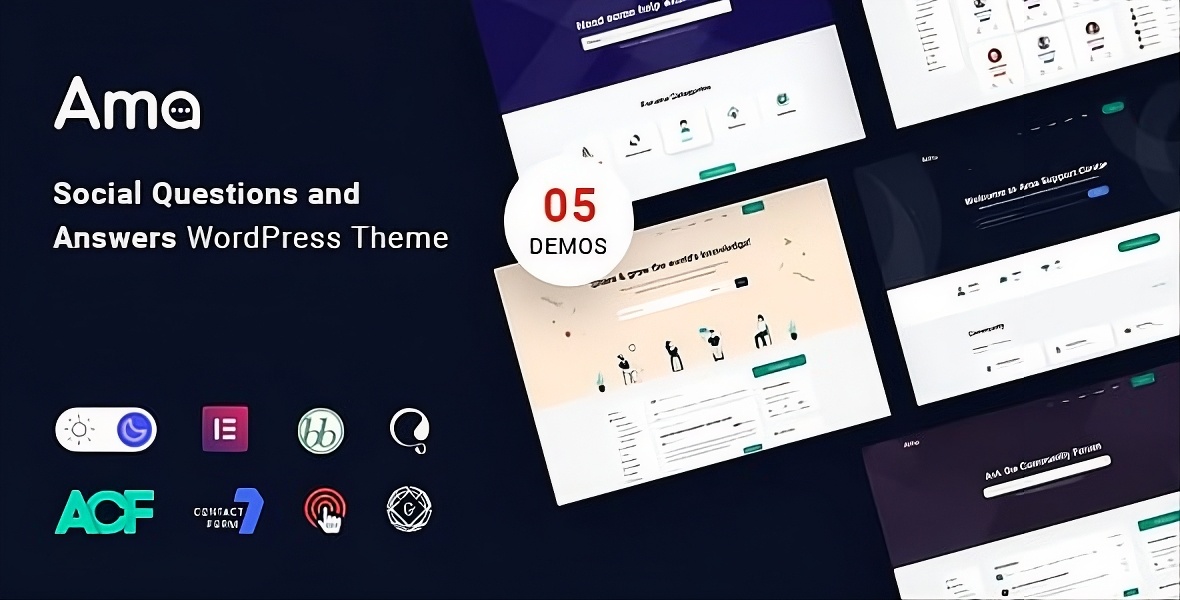
AMA is a WordPress theme that integrates with the bbPress plugin and allows users to ask and answer questions in a social Q&A format. The theme is designed to create a community of users who can share their knowledge and expertise with each other. The theme also includes a voting system, so users can upvote or downvote questions and answers to help surface the most useful and relevant content.
In addition to the Q&A functionality, the AMA theme also includes a number of other features to help create a vibrant and engaging community.
Overall, the AMA WordPress theme with bbPress, Social Questions and Answers is a great option for anyone looking to create a community-driven Q&A website. Its combination of social functionality, customization options, and support for multiple languages makes it a powerful and flexible platform for building a Q&A site.
It has taken bbPress to the next level. We have special features that will make your life smoother. Some of the notable features are Forum Subscription, Private Reply, Resolved Posts, Close Support topics, Total Views count, and much more.


Features
- 3 Beautiful pre-made homepage demos.
- Fully featured forum pages
- Flexible Header and footer
- Custom Widgets
- Amazing Elementor Widgets
- Custom Forum Elementor Addons
- Custom Topics Elementor Addons
- Custom Forum Widgets
- bbPress Supported
- Subscribe to forum feature
- Private reply feature
- Best Reply feature
- Bootstrap Grid System: Based on 1170px.
- Easy to Customize.
- Bootstrap 4 Responsive Framework.
- Easy to Customize.
- Unique and Modern Style.
- Search Engine Optimized Code.
- Clean & Modern Style.
- Well Documented.
- Well Organized Layers.
- Fully Customizable.
SOURCES & CREDITS
- Photo by Unsplash, Freepik
- Illustration by Freepik
- Icon by Flaticon & The Elegant Icon Font
Version 1.7.2 (April 03, 2026)
- Security: Enhanced search functionality and overall theme security
- Fixed: Resolved usability issues with the Dark Mode toggle button
- Improved: Significantly increased overall website loading speed and performance
- Improved: Texts and fonts now load much faster for a better user experience
- Improved: Faster and smoother documentation search results
- Improved: Enhanced accessibility for search forms, comment forms, and the "Back to Top" button
Version 1.7.1 (January 30, 2026)
- Added: Antimanual plugin added to required plugins list
- Fixed: Resolved unbounded query issue in AJAX post loading
- Improved: Updated required plugin name from BBP Core to Forumax
- Improved: Deprecated bbPress templates and configurations removed, forum settings migrated to Forumax
- Improved: Forumax plugin version check added with admin notice
- Improved: Blog category layout query optimized with proper pagination handling
- Improved: Optimized AJAX search queries by disabling unnecessary row counting
- Improved: Optimized ama_get_postTitleArray to fetch only required fields
- Improved: Optimized ama_get_page_title query using database-level filtering
Version 1.7.0 (December 20, 2025)
- New: Jobus plugin bundled with the theme for seamless job management integration
- Improved: Dark mode styles refined for better visual consistency
- Improved: Dark mode compatibility extended to container layouts and additional widget types
Version 1.6.0 (September 26, 2025)
- New: Added "Create Sign-Up URL" option in Forum settings
- Fixed: Resolved comment form design issues
- Tweaked: Improved Forum user profile page layout and overall user experience
Version 1.5.0 (April 22, 2025)
- New: Added Docs tab to the AMA Search widget
- Fixed: Resolved issues in Quote, Blog, and Testimonial widgets
- Fixed: Dark mode compatibility issues corrected
- Fixed: Deprecated function warnings resolved
- Tweaked: Improved Forum user profile edit page for better usability
- Tweaked: Enhanced Forum Topic page layout and readability
Version 1.4.2 (October 24, 2024)
- New: RTL (Right to Left language) compatibility added
- Fixed: Incorrect display of topics from other forums in bbp-single-forum shortcode
- Fixed: Topic tag page was showing all topics instead of current tag
- Fixed: Elementor Search widget resolved
- Fixed: Deprecated ACF RGBA color picker plugin code
- Tweaked: Improved Hero search & Search widget
- Tweaked: Updated demo contents
Version 1.4.1 (June 15, 2024)
- New: Added Spider Elements plugin – offers 20+ more widgets
- Tweaked: Compatible with WordPress Latest Version (6.5.4)
- Updated: Deprecated some of the Elementor functions
Version 1.4.0 (July 13, 2023)
- New: Added Dark Mode Color Controls in Elementor
- Tweaked: Removed some unnecessary CSS & JS files
- Removed: Pro Elements from the Ama Core plugin
- Updated: Deprecated demo importer plugin functions
- Updated: Demo Contents
Version 1.1.3 (September 4, 2022)
- Fix: Elementor Pro was conflicting with Ama Core plugin
- Improved: AJAX Searching Experience
Version 1.1.2 (August 21, 2022)
- New: Added voting feature (bbp-core plugin)
- New: Custom forum admin UI (bbp-core plugin)
- Fix: CSS issues in light and dark mode
- Removed: Purchase code validation and updating system
Version 1.1.1 (August 11, 2022)
- New: Added custom sign up page
Version 1.1.0 (August 4, 2022)
- Tweaked: Integrated BBP Core from official WordPress repository
Version 1.0.9 (August 1, 2022)
- Removed: Pro Elements plugin removed from required plugins list
- Fixed: PHP errors in Ama Core plugin
Version 1.0.8 (July 24, 2022)
- New: BBP Core Integration
Version 1.0.7 (July 17, 2022)
- New: EazyDocs Integration
- Fixed: Dark Mode issues
Version 1.0.6 (July 14, 2022)
- Fixed: Forum search broken issues
- Fixed: Purchase code verification problem
- Tweaked: Forum widget
1.0.5 (July 8, 2022)
- New: Auto update system
- Fixed: Dark mode issues
- Tweaked: Ama Newsletter
- Tweaked: Hero Banner Widget
1.0.4 (05 June 2022)
- New: Black and white logo uploader separately added
- Fixed: Forum topics page advanced filter result
- Fixed: Reply page header banner
- Tweaked: Checkbox improved on contact us page
- Tweaked: Single Forum Elementor widget improved
- Tweaked: Best reply CSS improved
1.0.3 (02 June 2022)
- Tweaked: Single Forum Elementor widget design improved
1.0.2 (14 May 2022)
- Fixed: Search and 404 page menu color and logo
- Fixed: Menu active color with header type
- Fixed: Forum replies widget icon
- Tweaked: Forum sidebar widget improved
- Tweaked: One click demo import contents updated
1.0.1 (15 Mar 2022)
- New: Home Creative
- Tweaked: Demo importer configuration
Contact Support
This store provides 6 months of support for this item. If you have purchased this item and need technical assistance, please open a support ticket.
Open Support TicketSupport Includes:
- Answering technical questions about item's features
- Assistance with reported bugs and issues
- Help with included 3rd party assets
7 Reviews
View on Spider ThemesGreat theme and amazing support. Very fast and helpful. Thank you!
I used the theme to create a community website and needed forum capability. The theme is very well designed and customisable and met all my needs.
I contacted support on multiple occasions because of some issues and was pleased to receive very fast replies to my queries. As a non experienced website creator, this was highly valuable.
Rated for Design Quality.
We like a design quality and their customer support was so excellent to resolve the issues.
The customer support I received was exceptional, fast, and effective. Thanks, AMA and SpiderThemes Team you are awesome
Nice work, thank you
Very nice theme, I like the design a lot! With the premade elementor modules, it is very easy to create a custom site in no time :)
57 comments found.
my website https://cipdforum.co.uk/ has taken dark mode automatically day and night while i prefer the website to be in bright mode all the time
Where do I change the theme font
Hi I can not install Ama Core pugin, respond by install = Plugin could not be activated because it triggered a fatal error.
I checked, there was no Q&A schema applied on the demo pages, and I am assuming you are not providing that schema either when you literally provided everything else like voting and selecting best answer. or am I wrong?
Schema has to be applied on the question answer page only, and preferred way is JSON-LD way as google understand that format faster without requiring multiple crawling which happens in the case of schema via Microdata
Hello, I installed the theme and configured all the required plugins, but I still can't see the images when I attach them to the forum replies. Any suggestions as to why they don't come out?
Do you provide this only on a plugin form? like a bbpress template? As I don't want to use this as a theme but as a plugin so I could retain my original theme along for other content on the site.
These plugins are part of the theme package or available to purchase separately? Also a demo login would be nice too to try.
Hi there,
A quick pre-purchase question: I am wondering if the loading animation (animation when you hit refresh) is customizable or can it be removed?
Thanks!
what is the main difference with the wordpress version and the HTML version. is one more powerful than the other? I already have a wordpress site but if it better to have it off wordpress might be better, less bloat? I just want to see if certain features are on wordpress to the html version that might not be on the other
ofcourse I know both differences and why. I am looking more the functionality and its features. As designs on both demos are very different, seems HTML has an ease of customization? One thing I want to do is try to make it look and act like Skool, where new posts are added in a feed style mode. can that be done via both?
Hi there!!
Is it possible to insert Google Ads and other type of banners?
Is it possible to increase the maximum file size allowed for attachments?
Is it possible to upload videos?
Thanks.
Hello,"Downvote" of the demo is incorrect
https://prnt.sc/eHWm_sW_71Ra
https://prnt.sc/5nEkNuA7A9wA
https://wordpress-theme.spider-themes.net/ama/forums/topic/most-requested-features-of-2020/
If I buy, "Downvote" of the demo is incorrect?
Thanks!
e adquirido el tema, pero tengo algunos incovenientes, no tengo la pagina de usuario y la pagina de publicar un tema me dio error al momento de abrir, necesito ayuda, este es mi correo electronico. [email protected]
I have purchased the theme, but I have some problems, I do not have the user page and the page to publish a topic gave me error when opening, I need help, this is my email. [email protected]