✅ Dark/Light Mode switcher.
✅ Font size switcher
✅ Onepage documentation
✅ Support Center with Forum
✅ Full RTL version included
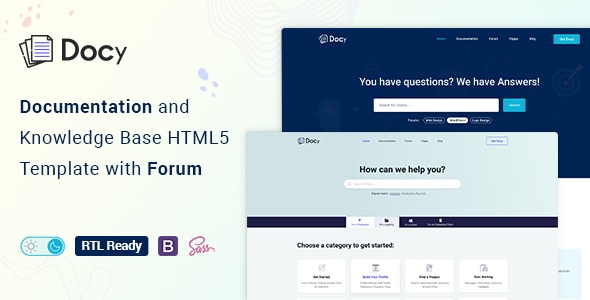
Docy is a powerful, responsive, and high-performance HTML online documentation template that can assist you quickly develop your next product’s documentation. It can be used for documenting API, frameworks, plugins, templates, software, user manual, etc. It’s based on Bootstrap 4 and includes a lot of elements to make your interactive documentation easy.

We designed Docy for the readers, optimizing not for page views or engagement — but reading. And it turns out that context is a vital part of learning.

All the pages has pure dark mode that easy on the eyes.

Scrollable Onepage Documentation
Docy is not only a template but also a package of tools for creating product documentation in the best way. We followed the best coding practice by maintaining w3.org standards, made it search engine friendly (SEO optimized), perfect on any device (desktop, laptop, mobile, iPad).
Tools and Functionalities
Here are some amazing tools that will help you build your product documentation interactively.
- Dark mode switcher.
- Font size switcher
- Full-width and Box width container-based.
- Article Table of contents (on this page)
- Documentation with sticky and non-sticky header
- Onepage documentation
- Documentation feedback
- Dynamic, informative pre-loader on every page
- Footnotes for doc reference
- Page preview tooltip
- Can I use? for showcasing appropriate and inappropriate options
- Image Hotspot to point out the targeted parts of an image
Features
- Responsive Layout
- Built with Bootstrap 4.3
- CSS3 & HTML5 validated by w3.org standards
- SCSS files included
- Megamenu
- Semantic coding
- 40+ Pages
- Sticky sidebar
- Full-width layout
- Syntax highlighter
- Button variations
- Typography
- Tabs
- Alerts / Messages / Notes
- Accordion
- Lightbox
- Tooltips
- Carousel
- Directory explanation
- File tree navigation
- Table of content
- Software Change-log
- Property table
- Article feedback
- Responsive video (YouTube, Vimeo, Self-hosted)
- Easy to Customize.
- Bootstrap 4 Responsive Framework
- Unique and Modern Style.
- Super Clear and Clean Layout.
- Awesome and Creative Design.
- Great CSS Animations.
- Search Engine Optimised Code.
- W3C Validated Code.
- Mailchimp integrated.
- Free Google Fonts.
- Free Font Based Icons.
- All Modern Browser Supported.
- Developer-friendly code.
- Free Update.
- Well Commented Code
Sources and Credits
- Icon Font: The Elegant Icon
- Icon Font: fontawesome
- Images Used: Freepik, Unsplash
Changelog
1.2.1 (18 July 2024)New: Added RTL version1.2.0 (17 June 2023)
Tweaked: Dark mode colors improved (major improvements done)1.1.4 (26 August 2021)
Tweaked: Blog Details 02 page
Tweaked: Dark Mode
1.1.3 (08 August 2021)
New: Blog Details 02 (Full with a sticky table of contents) - https://tinyurl.com/yfkqcjbr
Fixed: Google fonts not loading
1.1.2 (29 March 2021)
Tweaked: Template overall design
Tweaked: Changed some HTML structure
1.1.1 (10 March 2021)
Tweaked: Search Banner (Background color changed and background image used instead of the two separate images in the background.)1.1.0 (02 March 2021)
New: Creative Helpdesk and Contact pages added
Tweaked: Menu and files re-organized and renamed
Contact Support
This store provides 6 months of support for this item. If you have purchased this item and need technical assistance, please open a support ticket.
Support Includes:
- Answering technical questions about item's features
- Assistance with reported bugs and issues
- Help with included 3rd party assets
1 Review
View on Spider ThemesHello,
24 comments found.
I am receiving an error to upload template it says its missing css style sheet was I correct to upload in themes?
will there be a bootstrap 5 compatible version ?
Hey, I'm interested in this template, but the navigation on the left side of the onepage.html does not run the scroll bar in the documentation 100% with Can this be easily fixed?
https://youtu.be/26lgAoXD6KU
How can I change the header background on the documentation page?
https://ke123.me/?docs=//
These are the images of people relaxing at the show.
yes. I did.
b3829326-a109-428d ← a part
I bougt this account yestrday. but I got answer. thanks. your theme is wondeful!
Hi, I recently purchased this template... Thinking it was great for what I needed.
However, after analyzing the code I realized that it is extremely complex, and in my form of development, it is very disorganized.
They created a lot of DIV tags for panels that are totally unnecessary and that weigh a LOT of code.
When I entered the DEMO, the site took time to load, but this is normal when using the themeforest iframe. However, after downloading I realized that even on localhost everything took a long time to load, the .map files from the .js didn't come
Just to edit the HEADER of the page, I had to change 6 different sections... All to the same place... It doesn't make any sense.
This template might be good for Wordpress, but in plain HTML it sucks!
Sorry if I offended, but it's really bad for HTML.
I would like to request a refund of the same.
I want to buy this web template.Have a question to confirm.This is an html template. When I develop this into a dynamic publishing system, what rich text editor can support the style of your web pages?Because I can’t create each page manually.thanks
but the style of the Wysiwyg editor does not include the style of your web template
Hello, how can I uninstall night mode?
Sorr dark mode?
I cannot see where and in what file this setting is. In which js or css file should I set or change this setting?
But this is html, I bought theme which is html.
I deleted those Files, cleared the browser history. I also tried it in different browser. But still active.
I really couldn't do this.
I am using phpstorm and when I compiler I get an error.
I guess this is a computer related situation.
Could you please send me this file with dark mode disabled?
Can you tell me which file to work on?
Am I going to convert this .scss file to a .css file? I guess you could help with this.
If a comment is made up to 558 and 594 lines in the main.js file, it becomes disabled.
Hello,
I thought I bought the WordPress version. Now I see it's the wrong one. Can I change the purchase?
When navigating to a page, what triggers the side menu to open at the left for that page?
Please contact me for extended licensing questions. beau AT WebTigers DOT com. :-)